Accounts
Use Accounts to manage the account names used throughout the tracker.
Every tracker has two built-in accounts:
- Credit — your credit line or HELOC
- Brokerage — your investment brokerage account
You can rename these accounts with aliases, but their account types do not change.
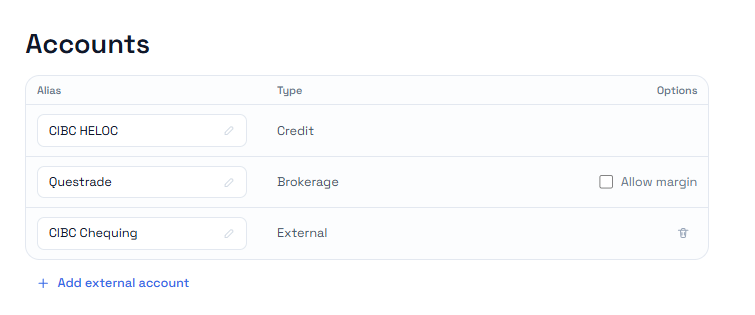
Allow margin
The Brokerage account has an Allow margin option.
When margin is off, events cannot create brokerage margin debt. Purchases, withdrawals, and transfers are limited by available brokerage cash.
When margin is on, the brokerage can move into margin debt when an event exceeds available cash. The app then tracks whether margin debt was created for investment use, capitalized deductible interest, or non-deductible personal use.
Turning margin on also enables margin-specific events and explanations, including Margin Interest Charge.
External accounts
External accounts represent chequing, savings, or other accounts where some lenders charge credit-line interest.
Use Add external account when you need to record interest charged outside the credit-line balance.
External account aliases can be edited. External accounts can also be deleted, but deleting an external account will block any existing external interest charge events that still reference it until you edit or delete those events.
Learn more
- Interest Charge — recording interest charged to a credit line or external account
- Brokerage margin — how margin-enabled brokerage balances work
- Setting up your first tracking — the basic setup flow